
Course template (Ultra)
The Learn.UQ course template supports teaching staff in delivering a consistent student learning experience across all courses and includes required items to meet minimum presence requirements.
“Staff should consider the best practice guidelines made available by the Institute of Teaching and Learning Innovation on the UQ eLearning website.” eLearning policy & procedure (Section 3.12)
A consistent course design helps students quickly locate resources, navigate with confidence, reduces cognitive load, and supports students who rely on assistive technologies to ensure all students can focus on learning, rather than navigation. For advice on getting started with your Learn.UQ course, please refer to the Getting started with Learn.UQ staff guide.
Learn.UQ course template structure
5. Content: Course Resources
Course Resources (strongly recommended)
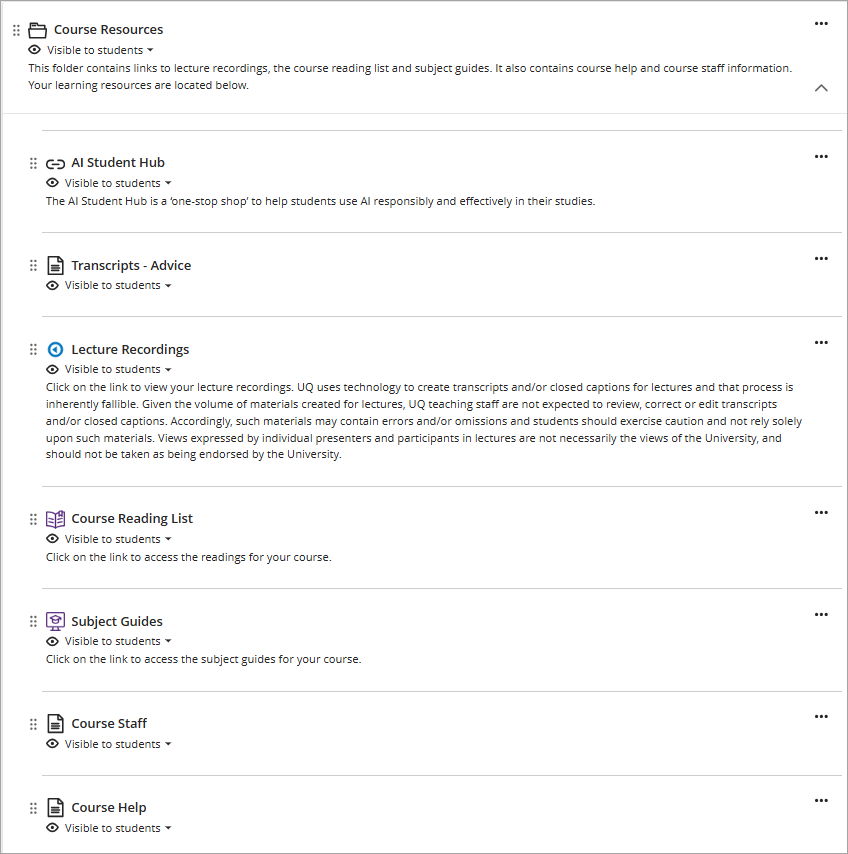
It is strongly recommended that you include the Course Resources folder which should sit below the Assessment folder. If preferred, you may make the Course Resources folder a Learning Module which allows you to use an icon. For step-by-step instructions, refer to the Create learning module and Icons and document banners guides.
AI Student Hub (recommended)
The AI Student Hub is a ‘one-stop shop’ to help students use AI responsibly and effectively in their studies.
Transcript – Advice (required by policy)
A document containing transcript advice which is required by the Recording of teaching at UQ procedure policy in Section 6.9.
Lecture recordings (technically required - if applicable)
A link to the course lecture recordings is technically required and will be included below the transcript advice. This link can be hidden if your course has no recorded teaching activities.
UQ Extend course content (technically required - if applicable)
If your course is using UQ Extend, this link is tecnically required and will take students to UQ Extend. Make this item visible to students if your course is using UQ Extend.
UQ Extend technical instructions and support (technically required - if applicable)
A document containing technical instructions/support for UQ Extend which is technically required. Make this item visible to students if your course is using UQ Extend.
Course Reading List (technically required - if applicable)
A link to a Library tool that allows you to view your course readings which is technically required. This can be hidden from students if your course has no reading list.
Subject guides link (technically required - if applicable)
A general Library subject / discipline guide that may be available for your course which is technically required. This link can be hidden from students if your course has no subject guide.
Course staff document (recommended)
A document containing photos and information on all course teaching staff including the Course Coordinator(s) and Tutor(s). It is recommended that you update the formatted template document with details of all teaching staff including Course Coordinators and Tutors. For step-by-step instructions, refer to the Create a document guide.
Course help document (strongly recommended)
A document containing information and links for support services available to UQ students. It is strongly recommended that you edit the document and add any course or school specific information where relevant. For step-by-step instructions, refer to the Create a document guide.
eLearning Adviser Consultations (via Zoom)
The eLearning Adviser Consultations offers one-on-one consultations to course teaching staff on adopting UQ eLearning technologies.