
Course template (Ultra)
The Learn.UQ course template supports teaching staff in delivering a consistent student learning experience across all courses and includes required items to meet minimum presence requirements.
“Staff should consider the best practice guidelines made available by the Institute of Teaching and Learning Innovation on the UQ eLearning website.” eLearning policy & procedure (Section 3.12)
A consistent course design helps students quickly locate resources, navigate with confidence, reduces cognitive load, and supports students who rely on assistive technologies to ensure all students can focus on learning, rather than navigation. For advice on getting started with your Learn.UQ course, please refer to the Getting started with Learn.UQ staff guide.
Learn.UQ course template structure
4. Content: Assessment
Assessment folder (strongly recommended)
It is strongly recommended that you include the Assessment folder which should contain an Assessment Summary document and sub-folders for each assessment item with the submission link, technical submission instructions, exemplars and other assessment information.
If preferred, you can make the Assessment folder a Learning Module which allows you to use an icon. For step-by-step instructions, refer to the Create learning module and Icons and document banners guides.
Assessment Summary document (recommended)
Your course template will include a template Assessment Summary document with a table which should provide information from the Course Profile about all assessment items.
We recommend you update the information in the template table according to Course Profile and make the document visible to students. For step-by-step instructions, refer to the Create a document guide.
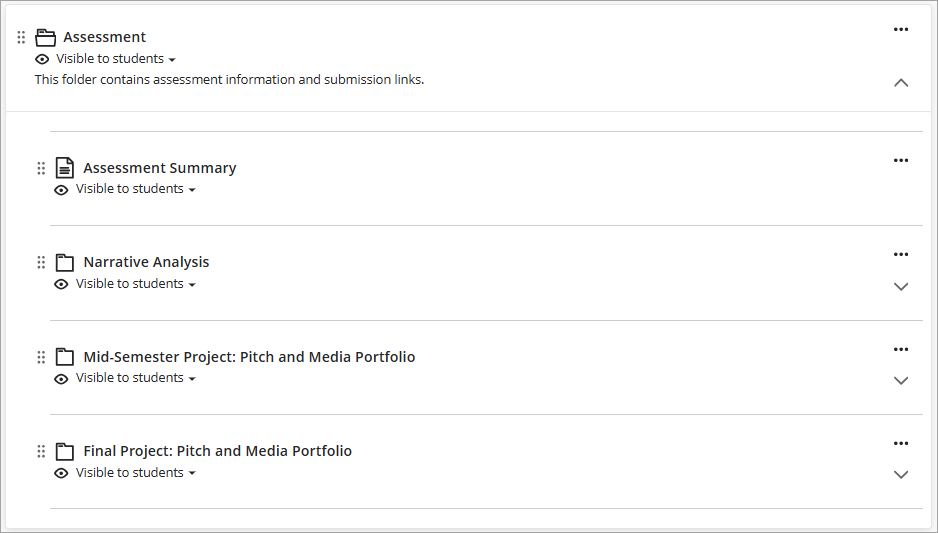
Assessment sub-folders (strongly recommended)
We strongly recommend you create a sub-folder for each assessment item or assessment sequence. For step-by-step instructions, refer to the Create a folder guide.
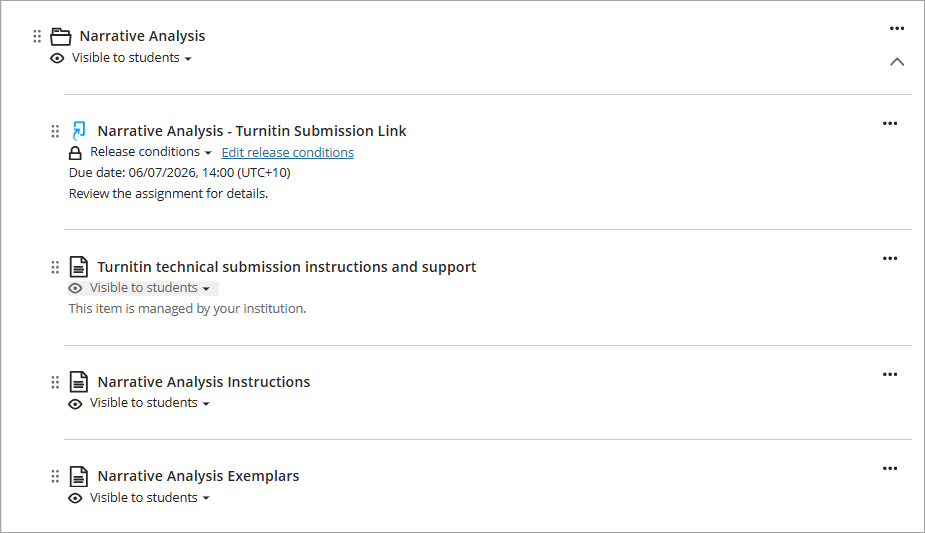
Within each sub-folder you should include in this order:
- the submission link
- technical submission instructions (refer to the Add assessment technical submission instructions guide)
- student assessment instructions
- exemplars
- other assessment information.
eLearning Adviser Consultations (via Zoom)
The eLearning Adviser Consultations offers one-on-one consultations to course teaching staff on adopting UQ eLearning technologies.