UQ Extend to Learn.UQ (Blackboard) conversion process (Ultra)
Overview
This guide outlines the recommended process for converting a UQ Extend course to Learn.UQ (Blackboard).
Note: There is no automated import path between these two platforms, therefore some parts of the conversion require a manual rebuild.
Tip: This guide uses the terms 'conversion' and 'rebuild' deliberately. Content is reconstructed in Learn.UQ (Blackboard) using the UQ Extend course as a reference source, not transferred via a file export/import.
1. Course structure
Access your UQ Extend course
- Access UQ Extend and open the course you are planning to convert to Learn.UQ. For more information, refer to the Access UQ Extend guide.
Note: If you do not have access to the course, the current Course Coordinator will need to provide you with access before proceeding.
- Review the course content structure. For more information, refer to the UQ Extend Course Structure guide.
Request Studio access to download files
You need access to Studio to download files from UQ Extend. If you are not the Course Coordinator, you will need to request they add you as staff to the UQ Extend course. For more information refer to the Add staff to a UQ Extend course page.
Access your Learn.UQ (Blackboard) course
Access Learn.UQ (Blackboard) and check to see if there is an existing Learn.UQ course for the required semester.
If the current Learn.UQ (Blackboard) course has already been created and is where you are hoping to copy the UQ Extend content across to, open that course.
OR
If you are copying the UQ Extend content into a different offering of the course (i.e. next semester's course), ensure you have access to that course and that it has been created. For more information, refer to the Order SI-net Courses and UQ Extend Courses guide.
Determine relevant structure for your course
The table below maps each level of the UQ Extend structure to its closest Learn.UQ (Blackboard) equivalent. It is important to understand the course structure mapping as this will be the foundation for planning the rebuild.
For more information on the hierarchy in UQ Extend, refer to the UQ Extend Course Structure guide.
Note: A key structural difference is that UQ Extend contains a single page that can hold multiple components. In Learn.UQ (Blackboard), each component becomes a separate content item. A course that appears compact in UQ Extend (e.g., 10 units × 4 components = 40 components) will produce more individual items in Learn.UQ (Blackboard).
Tip: Learn.UQ (Blackboard) supports up to 3 levels of folder nesting (e.g., Learning Module > Folder > document/Item). Plan your structure before you start rebuilding — deeply nested UQ Extend content will need to be flattened.
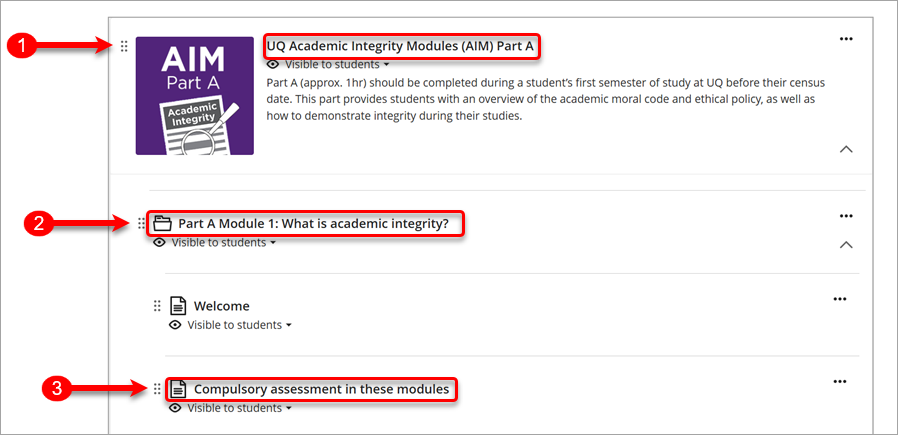
Basic course structure where all course content was in UQ Extend
| Reference in image | UQ Extend | Learn.UQ (Blackboard) |
|---|---|---|
| 1 | Section | New learning module |
| 2 | Subsection | Folder within the new learning module |
| 3 | Unit with content | Document within the folder |
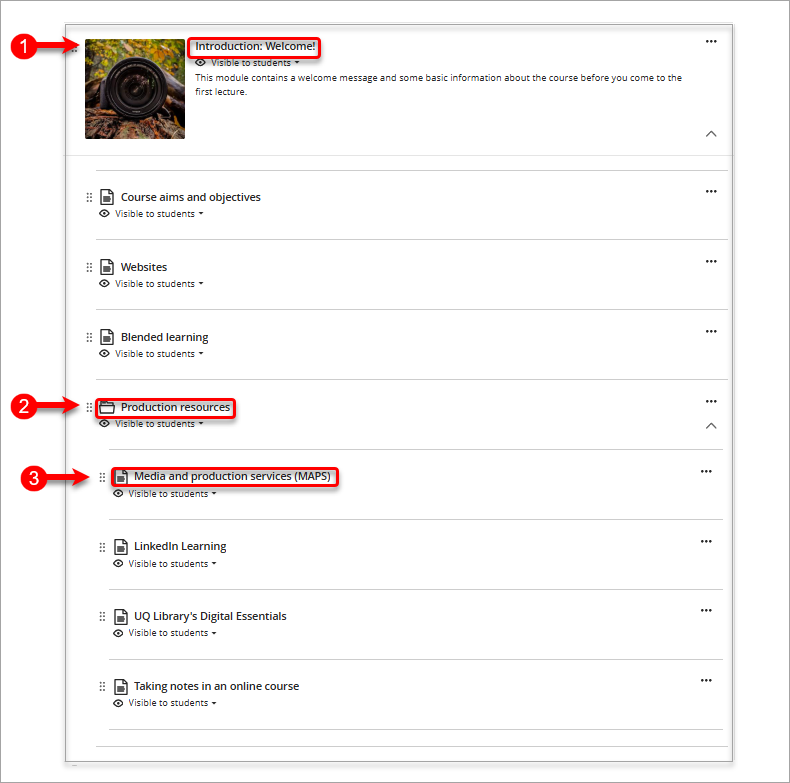
Basic course structure when merging with existing content in Learn.UQ (i.e. content within weekly/module learning modules)
| Reference in image | UQ Extend | Learn.UQ (Blackboard) |
|---|---|---|
| 1 | Section | Current learning module |
| 2 | Subsection | Folder within current learning module |
| 3 | Unit with content | Document within the folder |
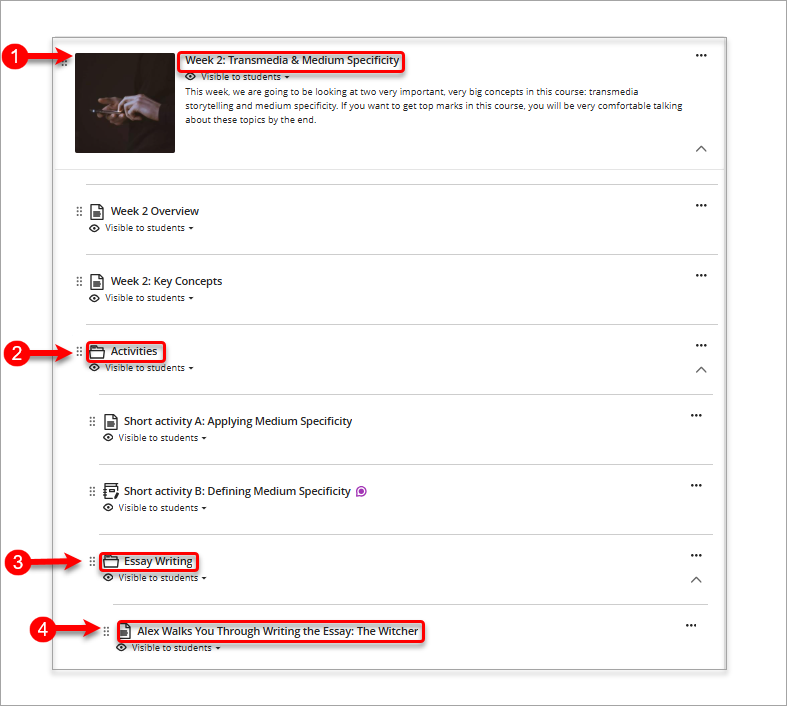
Complex course structure when merging with existing content in Learn.UQ (i.e. content within weekly/module learning modules)
| Reference in image | UQ Extend | Learn.UQ (Blackboard) |
|---|---|---|
| 1 | Section | Current learning module |
| 2 | Subsection | Folder within current learning module |
| 3 | Unit | Sub-folder within the folder |
| 4 | Unit content | Document within the sub-folder |