
Getting started with Learn.UQ (Ultra Student)
Learn.UQ (Blackboard) is the Learning Management System used to help deliver UQ courses.
Video guide
Watch the Getting started with Learn.UQ video (Echo360, 4m 40s)
7. Content: Course Staff and Details & Actions
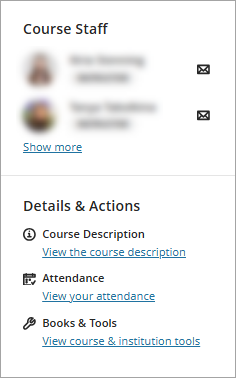
Course Staff
This section lists the Course Coordinator(s) and allows you to click on the icon to email them directly.
Note: Only use the mail icon to directly email staff if this is the communications directive provided by your Course Coordinator.
Details & Actions
Course Description: Contains a brief description of your course.
Attendance: Not in use at UQ.
Books & Tools: Lists tools available at UQ, however the tools you will be using in your course will be linked in the relevant section of the Content page.
Library AskUs team
The Library AskUs team are available to provide student technical support with Learn.UQ (Blackboard) courses.