Create a Buddycheck Points division peer evaluation (Ultra)
Why would I use a Points division peer evaluation?
A Points division peer evaluation using Buddycheck allows students to rate their peer's performance across a series of questions by dividing a set number of points (default is 100) amongst the group members, providing staff with insights into how individual students have performed within their group.
Once the peer evaluation is completed and the results have been moderated, a coordinator can apply an Adjustment Factor (multiplier) against a group's assessment mark in Gradebook.
Warning: To prevent Buddycheck results from being automatically released when published to the Gradebook, ensure you select the option to create a Gradebook column during the initial setup so that the column can be hidden from students after setup.
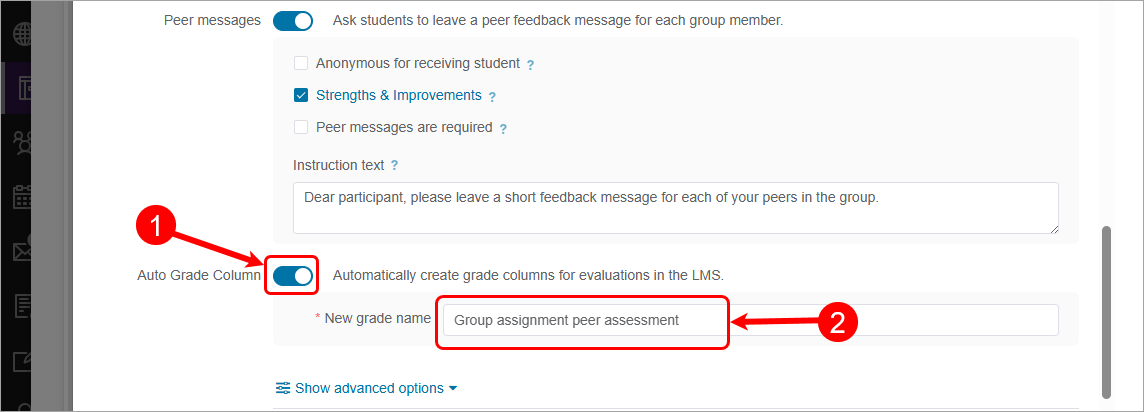
6. Setup Gradebook column
Warning: To prevent Buddycheck results from being automatically released when published to the Gradebook, ensure you select the option to create a Gradebook column during the initial setup so that the column can be hidden from students after setup.
Tip: Setting up the Gradebook column during creation enables early configuration of the Total Percentage column.
- Check the Auto Grade column checkbox.
- Click on the New grade name textbox and update the Gradebook column name if desired.