Register for Ready to Teach and Ready to Tutor Week
Get ready for Semester 1, 2026 with Ready to Teach Week (9–13 February) and Ready to Tutor Week (24–26 February). Join us for an exciting line up of practical, hands-on seminars and workshops, designed to help staff develop course materials in preparation for the upcoming semester.
Sessions will explore practical tips on preparing students for learning with (and without) generative AI, what data can and can’t tell you about your student’s progress, presenting for educational media and more. Register now to save your spot!
Register for Ready to Teach Week >>
Register for Ready to Tutor Week >>
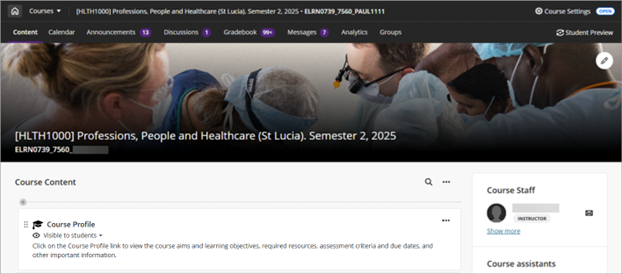
Refreshed Learn.UQ course landing page
Learn.UQ Blackboard Ultra courses now open in full‑screen mode to make better use of screen space, improve performance, and reduce navigation errors such as accidental exits.
The course banner now spans the full width of the screen, with the course code, title and semester displayed on a darker background for improved clarity and accessibility.
A new Home button replaces the previous X button, allowing you to return to the Courses landing page more easily. A Course Switcher has also been added, enabling quick navigation between your 4 most recently accessed courses.
Uploading video files directly to Blackboard course sites is no longer available
To ensure video transcripts are automatically generated for accessibility reasons, all videos in Learn.UQ (Blackboard) courses will need to be uploaded through EchoVideo. The option to directly upload video files outside of EchoVideo will no longer be available.
Teaching staff can:
- embed videos using the EchoVideo Deep Linking Tool, or
- add videos to their Echo360 classroom via the Lecture Recording link.
February eLearning workshops
The ITaLI eLearning team are offering a range of practical workshops during February to help staff prepare for Semester 1, 2026. Topics include Turnitin (updated), Blackboard Ultra, EchoPoll, Microsoft Teams, Ed Discussion, Inspera Exams and Learn.UQ Accessibility Tools.
For information on each workshop, dates and how to register, visit the eLearning workshops event page.
View all eLearning workshops >>
Course Teams archive
All course Microsoft Teams sites created for the academic year (including Semester 1, Semester 2, and the previous Summer Semester) are archived and restricted to view-only (non-editable) after deferred and supplementary exams each year. Staff can share this student guide on course Teams archive with their students.
Confirm your Semester 1 reading lists
Course coordinators, please ensure your course reading lists are published and available to students by Week 1. The course reading lists for Semester 1, 2026 page provides instructions and offers tools to help you find Aboriginal and Torres Strait Islander resources, as well as Library modules, guides, and videos for your course.
iThenticate – text matching for research papers
The iThenticate text matching system for researchers is available to all UQ staff. While iThenticate uses the same underlying technology and database as Turnitin, the functionality, user experience and reports are designed to meet the needs of researchers. iThenticate allows you to quickly upload, check and examine documents using a web-based interface. Researchers can also share documents, collaborate in groups and view in-depth analytics to provide visibility of content submissions and levels of originality over time.
AI Teacher Hub updated for Semester 1, 2026
The AI teacher Hub has been updated for Semester 1 to include:
- more examples of talking with students about AI
- videos exploring examples of teaching with AI
- links to the AI Researcher Hub
- case studies of UQ practice with AI from the Inquiry in Action book.
What's on
Explorance APAC Summit Tour 2026 UQ Premier Event I 3 February 2026
Registration is now open for the Explorance APAC Summit Tour that will be held at UQ, St Lucia on 3 February 2026. This event brings together regional education leaders, decision-makers, and professionals to explore and discuss topics related to student engagement, wellbeing, institutional research, teaching and learning, IT and quality assurance that help drive advancement towards institutional excellence. Use the code UQSTAFF26 at registration to access discounted ticket pricing for UQ staff.
eLearning online workshops (Zoom)
- Active Learning with EchoPoll | 2 February, 10–11:30am,
- Learn.UQ Ultra Basics | 3 February, 17 February, 10–12noon
- Learn.UQ Ultra Assignments | 3 February, 1–2:30pm
- Turnitin | 4 February, 10–12noon
- Learn.UQ Ultra Tests | 4 February, 1–2:30pm
- Microsoft Teams for Teaching and Learning | 5 February, 10–12noon
- Learn.UQ Ultra Gradebook | 18 February, 10–12noon.
eLearning training (self-paced)
- Learn.UQ Ultra Basics
- Learn.UQ Ultra Assignments (group and video)
- Learn.UQ Ultra Tests
- Learn.UQ Ultra Gradebook
- Inspera Assessment – Exams
- Inspera Assessment – Quizzes
- Inspera Assessment – Marking
Teaching and learning support
eLearning support
For technical support with central eLearning tools, email eLearning support.
eLearning Advisers
To receive pedagogical advice from UQ's leading teaching technology experts on using our central eLearning tools, including how to select and configure learning technologies, book a Zoom consultation with an eLearning Adviser.
Workshops
Workshops (via Zoom) and self-paced online modules are available for a variety of systems and tools. eLearning advisers are available to deliver custom workshops in your school or faculty. Organise a custom workshop.
Learning Designers
Learning Designers provide pedagogical support to academics in curriculum and assessment design, collaborating on learning experiences and activities, and integration of evidence-informed teaching and learning practices.
For faculty or school-level support, please refer to the list of Learning Designers in your area.
Educational Media Production
The ITaLI Educational Media Production Team works closely with academics and Learning Designers to produce educational videos, audio content, graphics and animations that support teaching and learning initiatives across UQ. If you have a project that could benefit from video, animation or graphic design, you are invited to submit an Expression of Interest.