Create a Gradescope Bubble Sheet Assignment (Ultra)
This guide provides instructions on how to scan and mark paper bubble sheets using Gradescope.
Note: Use of Gradescope bubble sheets is a UQ centrally supported exam option.
Note: Gradescope will only work with papers using the Gradescope Bubble Sheet template.
Note: Gradescope uses US naming conventions for academic terms and will default to the current North American term time. Requests have been made with the vendor to provide Australian terms but in the meantime, staff and students can simply ignore the term name and refer only to the course name.
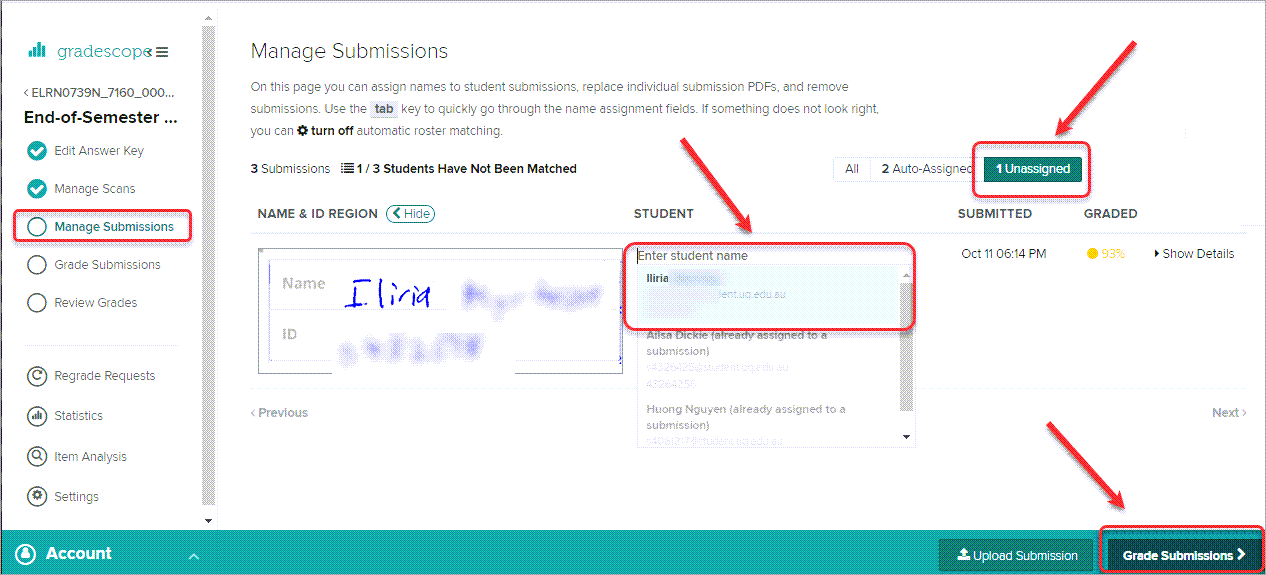
7. Manage Submissions
Gradescope will match papers to students using their names and ID number. You will need to select the correct student to match unassigned papers.
- Click on the Unassigned button.
- Select the required student from the Enter student name drop-down list.
- Repeat for all unassigned papers.
- Click on the Grade Submissions > button.