Skip to menu
Skip to content
Skip to footer
Menu
Study
Research
Partners and community
About
Search
eLearning
Home
Staff Guides
Student Guides
Workshops
Services
Projects
News
About
Contact
Study
Research
Partners and community
About
UQ home
News
Events
Give
Contact
Search term
UQ home
News
Events
Give
Contact
eLearning
Menu
Home
Staff Guides
Student Guides
Workshops
Services
Projects
News
About
Contact
Getting Started with iThenticate (Ultra)
Home
Staff Guides
iThenticate (Ultra)
Access iThenticate
Submit a document for comparison
Share an iThenticate Document Report
Access a Shared Document Report
4. Access a Shared Document Report
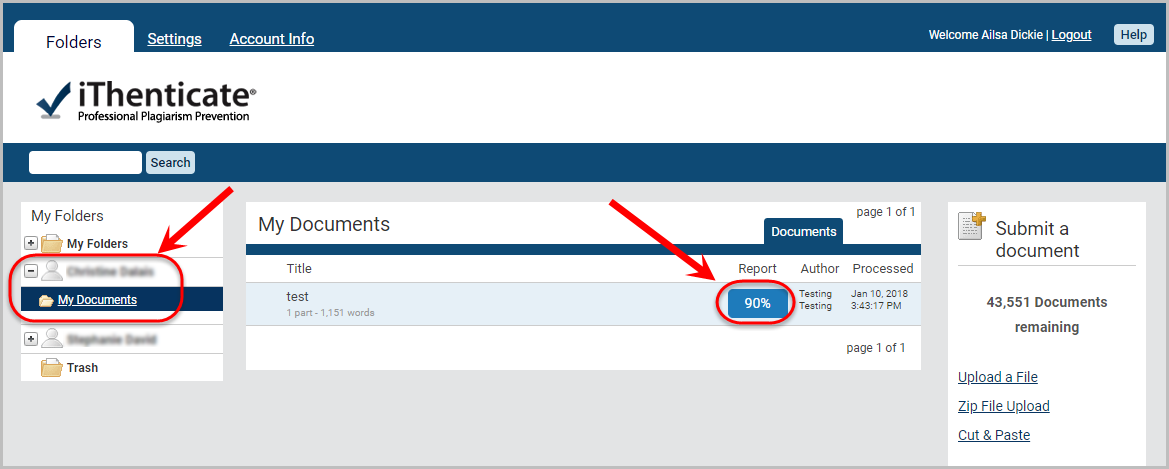
Click on the person's name in the menu.
Click on the required folder.
Click on the report button for the relevant document.
Share an iThenticate Document Report
Previous
Getting Started with iThenticate (Ultra)