
FAQs: Turnitin update 2026
Answers to frequently asked questions about the Turnitin update project and functionality. If you have additional questions please email projects@elearning.uq.edu.au.
How is it different is the 'new' Similarity Report in Turnitin?
The New Similarity Report in Turnitin is more intuitive and better presented than the old report. The main difference between the new and the 'old' is the use of match categories. These make it easier for marking staff to identify areas of investigation and discern the types of referencing errors that their students are making. These can be used to provide meaningful feedback to students. See the Overview from Turnitin for further information.
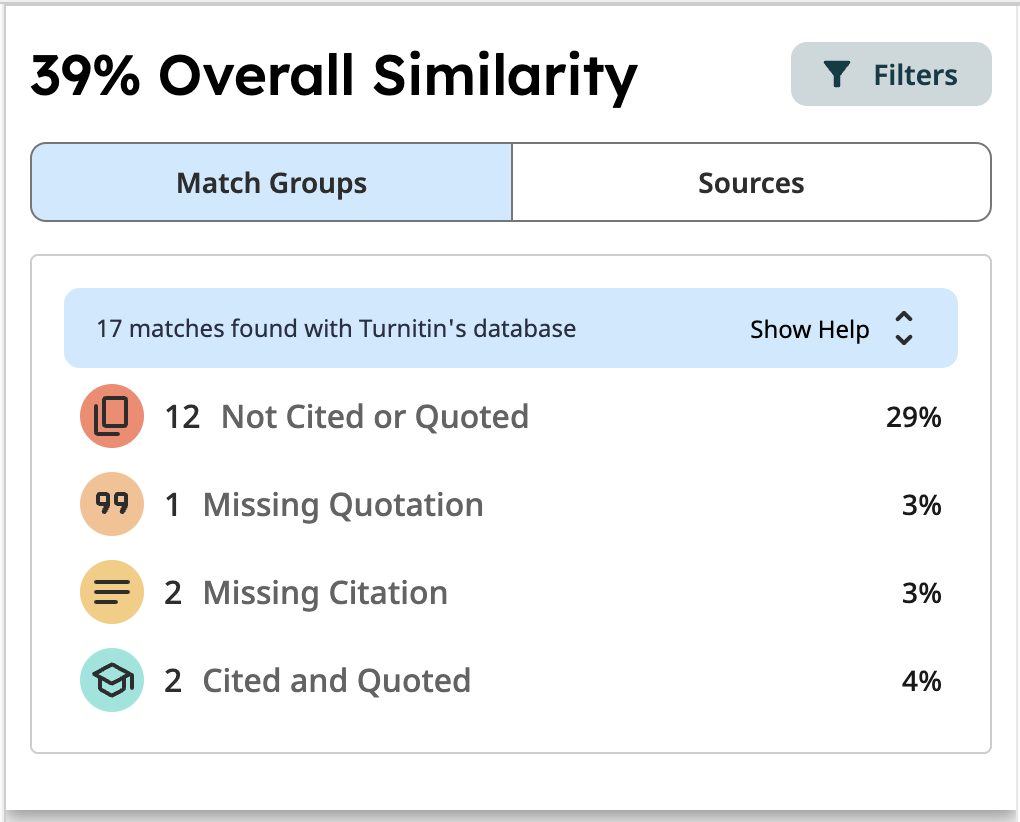
The next main difference is the two tabs at the top, which allow users to switch conveniently between the match categories of similarity and the sources.
Other noticeable differences are:
- more information about each source
- simplified settings to exclude certain match types
- improved accessibility in the interface
- a toggle on/off to show overlapping sources.
Are 'half marks' available for totals?
Yes. In the new Turnitin, rubric criteria and performance levels can be set to points with up to 2 decimal places. Rubrics with mark ranges can include minimum and maximum values to 2 decimal places, and rubric results are calculated to 2 decimal places (e.g. 75.55/100).
When the final grade is applied, it is calculated to 2 decimal places and transferred to the Gradebook. For example, if the assignment maximum is 30 points and the rubric result is 75.55/100, the grade transferred to Gradebook will be 22.67/30.
Note: Where practical, it is recommended you mark assignments out of 100 and apply weighting when calculating the final mark in Gradebook.
Can I reuse old assignments?
Turnitin submission links from previous semesters must be deleted and recreated to ensure marks transfer correctly to Gradebook. Refer to the Create a Turnitin Assignment guide.
Because all assignment settings need to be reviewed, it is recommended you create a new assignment rather than copying an old one. You can still import and duplicate older rubrics for use in new assignments. Refer to the Migrate your rubrics and Managing rubrics and grading forms guides by Turnitin.
Can I convert Classic Standard points rubrics to new Weighted range rubrics?
Yes. The process is:
Import your Classic rubrics into the new Turnitin.
Download the rubric as a spreadsheet.
Change the rubric type to Weighted Range Rubric.
Replace the points in each column with a minimum–maximum range (format: 85–100).
Save and re-import the rubric.
For more information, refer to the Convert a Standard points rubric to a Weighted range rubric guide.
Can I set up a rubric with the highest score in the first column?
Yes. However, when marking, only the full rubric view will display the highest score first. The slider view displays values from minimum to maximum.Can I set up a rubric with the highest score in the first column?
Can I filter Turnitin by Blackboard groups?
No. This functionality is not yet available in the new version of Turnitin. The vendor has this functionality on their roadmap. Provide feedback on the importance of this functionality to the vendor.
The recommended workaround is to either search for students OR instruct students to include their tutorial group in their file name. i.e. so you can search on "Tutorial 2".
Can I add a summary audio (or video) comment?
No. This functionality is not yet available in the new version of Turnitin. The vendor has this functionality on their roadmap. Provide feedback on the importance of this functionality to the vendor.
The use of EchoVideo is recommended as a workaround for replacing audio comments, refer to the Turnitin - adding voice summary comment temporary workaround guide.
Is the PeerMark peer assessment tool available?
No, with the transition to the new Turnitin this functionality is no longer available. It is recommended that you consider using the Blackboard Peer Review tool and also booking a eLearning Adviser Consultation.
Is the marker's name displayed to students?
Yes. Comments and quickmarks display the marker's name and a time/date stamp to both teaching staff and students.
UQ has requested that the vendor implement an option to disable this functionality. This functionality is not yet on the vendor's roadmap. Provide feedback on the importance of this functionality to the vendor.
How do I mark a non submission assignment? i.e. Oral or presentation
Grading without a file submission functionality is currently not available in the new Turnitin.
Alternatives including
- Creating a Blackboard assignment with the setting for an non-submission assignment.
- Creating a standard Turnitin assignment and uploading a file (blank) on the students behalf for each student.
- Change the assignment so it requires a file upload, i.e. notes or slides for a presentation